The arrival of Shopify Canvas introduces a significant conceptual transition in storefront design, offering direct-manipulation spatial composition directly within the native theme engine. Yet, for ecommerce leaders, technical directors, and agency architects, adopting an emerging layout technology involves far more than creative exploration: How does Canvas integrate into existing deployment pipelines, what are the architectural risks of early adoption, and how should merchants govern page building without destabilizing core revenue funnels?
While Canvas eliminates recurring third-party page builder fees and client-side runtime bloat, enterprise-scale storefronts require rigorous change management. Moving production assets to a visual layout paradigm requires balancing creative velocity against data structure longevity.
In this concluding architectural roadmap, we provide an objective adoption matrix, outline risk mitigation protocols, examine enterprise case studies, and demonstrate how a decoupled navigation architecture establishes stability throughout technical transitions.
- The Architectural Commitment: Canvas writes directly to theme JSON blocks (
templates/*.json). While this ensures native Liquid speed, it binds custom layouts to themes supporting Canvas block schemas. - Tiered Adoption Strategy: Fast-moving brands with curated inventories should adopt Canvas immediately for storytelling pages. Enterprise merchants with complex ERP/PIM integrations should implement a phased sandbox model.
- Governance & Design Tokens: Without strict team governance, unbounded spatial dragging creates fragmented typography and inconsistent spacing scales. Centralized design tokens are mandatory.
- Decoupled Navigation Safeguard: Isolating the global navigation layer (mega menus, mobile bottom docks) via an independent service like Navi+ ensures taxonomy remains 100% stable regardless of internal page changes.
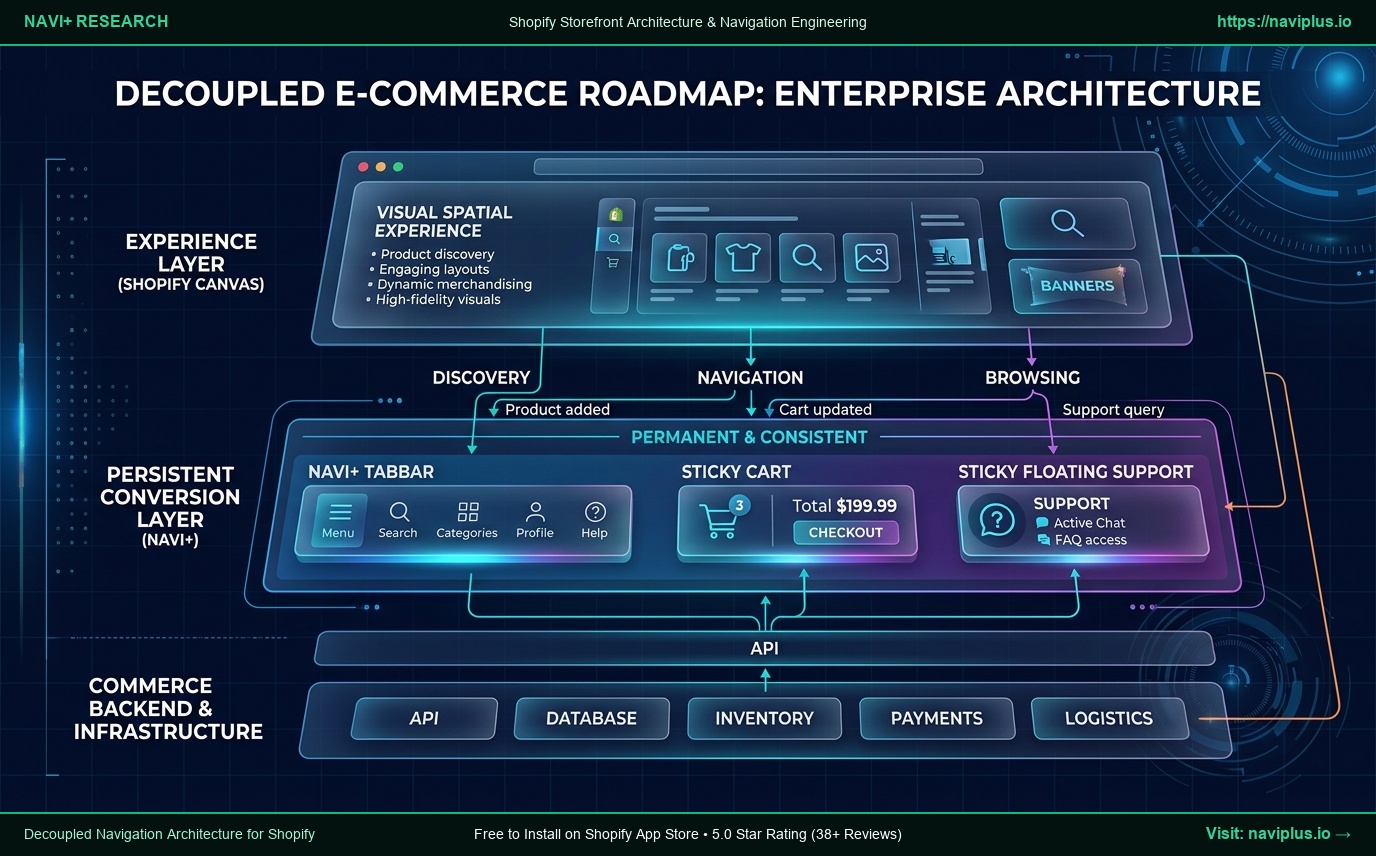 Concept illustration: The enterprise adoption matrix mapping Canvas landing page creation alongside decoupled navigation infrastructure.
Part of the Topic HubExplore the Shopify Canvas Spotlight Hub with all 10 technical deep-dives →
1. Enterprise Readiness: Evaluating Canvas Across Technical Dimensions
Before committing production resources to Shopify Canvas, technical teams must audit four core operational dimensions:
[Enterprise Canvas Readiness Audit]
  │
  ├─ 1. Schema Stability & Version Control
  │      Does your team use Git-based theme workflows?
  │      (Canvas writes to templates/*.json; requires clean branch merging protocols)
  │
  ├─ 2. Third-Party App Compatibility
  │      Do your conversion funnels require specialized App Blocks (Subscriptions, Reviews)?
  │      (Verify that mission-critical apps render cleanly inside spatial Canvas containers)
  │
  ├─ 3. Internationalization & Translation Workflows
  │      Does your store use Shopify Markets with multi-language path prefixes?
  │      (Verify that text strings in spatial blocks translate cleanly via GraphQL translation APIs)
  │
  └─ 4. Global Navigation Governance
         Are headers and mobile navigation decoupled from page templates?
         (Ensure marketing experimentation never overwrites global category trees)
2. Real-World Store Audits: How Global Brands Manage Innovation
Examining how large-scale Shopify merchants govern front-end innovation provides clear blueprints for risk management.
Case 1: Gymshark (Isolated Campaign Sandboxes)
- Deployment Strategy: Gymshark separates core transactional templates (Cart, Checkout, Account, Primary PLP) from experimental campaign landing pages.
- Governance: New layout paradigms are trialed on temporary, campaign-specific URLs before being incorporated into foundational templates. Core revenue pathways remain locked to battle-tested Liquid structures.
- Architectural Takeaway: Never expose your entire catalog template structure to an early-access visual editor simultaneously. Sandbox new design paradigms first.
Case 2: Allbirds (Design System Primacy)
- Deployment Strategy: Allbirds maintains a rigorous component library governed by design tokens.
- Governance: When new visual tools are adopted by merchandising teams, all elements must conform to pre-approved color values, font scales, and container widths.
- Architectural Takeaway: Direct-manipulation visual tools must operate within engineered constraints; otherwise, brand visual consistency quickly degrades.
3. The 3-Tier Enterprise Adoption Matrix
Not every ecommerce business should adopt Shopify Canvas at the same velocity. We categorize storefront profiles into three distinct strategic tiers:
| Adoption Profile | Typical Store Profile | Recommended Canvas Strategy | Navigation Architecture |
|---|---|---|---|
| Tier 1: Immediate Adoption | Fast-growing DTC brands, <50 SKUs, single-product drops, creative lifestyle stores | Full Deployment: Build homepage, campaign landing pages, and editorial stories natively in Canvas. | Decoupled bottom dock (Navi+) for thumb-zone conversion. |
| Tier 2: Phased Hybrid | Mid-market retailers, 50–500 SKUs, multi-category catalogs, active marketing teams | Hybrid Model: Keep core collection templates in standard Liquid; build campaign funnels in Canvas. | Decoupled mega menu + mobile tab bar to unify discovery across templates. |
| Tier 3: Staged Observation | Enterprise Plus brands, 500+ SKUs, complex ERP integrations, custom headless stacks | Sandbox Only: Evaluate Canvas on private staging themes. Await broad third-party app block maturity. | Fully decoupled navigation API layer across all environments. |
4. Technical Trade-Offs & Governance Pitfalls
When scaling Shopify Canvas across distributed teams, engineering leadership should establish protocols against three primary failure modes:
1. The “Git Conflict” Challenge in JSON Templates
When multiple team members edit pages simultaneously in a visual editor, Canvas writes state changes back to templates/*.json.
- Merging competing branches containing hundreds of spatial coordinate adjustments can create complex JSON merge conflicts.
- Governance Rule: Assign explicit template ownership. Only one editor should modify a specific page template within a deployment sprint, and production branches must be synchronized prior to editing.
2. Orphaned App Blocks & Broken Layouts
- Dropping third-party app blocks into freeform spatial containers can cause layout clipping if the app injects dynamic iframes or variable-height elements.
- Governance Rule: Test all app block integrations (e.g., Klaviyo forms, Loox reviews, Yotpo widgets) in mobile preview before publishing spatial sections.
3. Translation Parity in Shopify Markets
- Spatial text containers that look perfectly balanced in English can overflow or wrap awkwardly when translated into German, French, or Japanese.
- Governance Rule: Audit translated locales on narrow mobile viewports (390px) to verify that longer foreign language strings do not break container boundaries.
5. Migration Roadmap: Phased Transition to Shopify Canvas
Follow this sequential 4-stage roadmap to adopt Shopify Canvas with zero operational downtime:
[Phase 1: Environment Preparation]
  ├─ Clone active production theme into an isolated Staging Theme (do NOT publish)
  ├─ Audit theme code to ensure compatibility with nested blocks
  └─ Establish baseline Core Web Vitals (LCP, CLS, INP) on key pages

[Phase 2: Navigation Layer Decoupling]
  ├─ Activate Navi+ via App Embed on both Live and Staging themes
  ├─ Configure Desktop Mega Menus and Mobile Bottom Tab Bar
  └─ Verify 100% navigation parity and thumb reachability independently of theme code

[Phase 3: Sandbox Canvas Construction]
  ├─ Build initial campaign landing pages and editorial sections inside Canvas
  ├─ Audit mobile responsiveness across 390px and 768px viewports
  └─ Conduct cross-browser testing in Safari, Chrome, and Firefox

[Phase 4: Staged Production Rollout]
  ├─ Publish initial Canvas landing pages under campaign-specific URLs
  ├─ Monitor real-time conversion rates, TBT, and error logs for 14 days
  └─ Gradually expand Canvas blocks to core brand pages based on performance metrics
6. The Navi+ Role: Architectural Continuity Across Theme Lifecycles
Throughout theme updates, design overhauls, and platform evolutions, one structural reality remains constant: global navigation governs product discovery and customer conversion.
How Navi+ Protects Your Merchant Roadmap:
- Decoupled Architecture: Navi+ hosts your store’s navigation tree on global Cloudflare R2 infrastructure (~12KB gzip). It operates completely independently of theme Liquid templates or Canvas JSON blocks.
- Universal Theme Portability: Whether your store runs on Dawn, transitions to Canvas, explores Horizon, or evolves into a headless architecture, your mega menus and mobile bottom tab bars remain fully functional with zero reconfiguration.
- Ergonomic Excellence: Canvas does not govern the mobile thumb zone. Navi+ anchors 4 to 5 essential action nodes (Home, Collections Drawer, Live Search, Cart, Support) directly in the comfort zone of one-handed mobile users.
- Zero Performance Overhead: Delivering navigation asynchronously from edge caches ensures that adding rich menus introduces negligible main-thread blocking, preserving pristine Core Web Vitals.
7. Merchant Implementation Checklist for Canvas Governance
Before expanding Shopify Canvas across your organization, verify every item on this operational checklist:
- Staging Isolation: Are all Canvas development activities restricted to unpublished sandbox themes?
- Template Ownership Assigned: Is there a clear protocol to prevent simultaneous edits to the same JSON template?
- Design Token Adherence: Do all visual blocks conform to standardized brand typography and color scales?
- Mobile Thumb Ergonomics: Can shoppers effortlessly navigate between collections with one thumb?
- App Block Compatibility Audit: Have all third-party subscription and review blocks been verified inside Canvas?
- Multi-Market Translation Audit: Have all localized language versions been audited for text overflow?
- Navigation Independence: Is your global navigation layer decoupled from page-level templates via Navi+?
Sources & Technical Documentation
- Shopify Developer Documentation, Theme Architecture, Blocks, and Canvas Roadmap (Shopify Editions 2026).
- W3C Web Performance Working Group, Core Web Vitals Best Practices for Enterprise Commerce.
- Nielsen Norman Group (NN/g), Design System Governance and Front-End Team Alignment.
- Google Chrome DevRel, Optimizing Responsive Layout Engines for Cross-Device Performance.
- Shopify Markets API Reference, Managing Translations in Nested Block Themes.